
In today’s fast-paced software development landscape, organizations strive to deliver high-quality applications rapidly and efficiently. However, without a structured approach, deployment delays, integration challenges, and operational inefficiencies can hinder progress. This is where DevOps Best Practices for Faster Deployment and CI/CD Efficiency become indispensable.
DevOps integrates development and operations to streamline software delivery, enhance collaboration, and ensure continuous improvement. At the core of this methodology is CI/CD (Continuous Integration and Continuous Deployment/Delivery), which automates key processes to accelerate deployment cycles while maintaining reliability.
This article explores DevOps Best Practices that optimize faster deployment and CI/CD efficiency, ensuring software teams can achieve seamless, automated, and high-performance delivery pipelines. By implementing these strategies, organizations can reduce deployment risks, enhance productivity, and improve software quality.
Understanding DevOps and CI/CD
Before diving into DevOps Best Practices for Accelerated Deployment and CI/CD Efficiency, let’s first lay a solid foundation by understanding the core concepts.
What is DevOps?
DevOps is the practice of merging software development (Dev) with IT operations (Ops) to foster enhanced collaboration, streamline workflows, and significantly improve the speed and reliability of software delivery. This integrated approach breaks down traditional silos, encouraging continuous feedback and faster innovation, ultimately enabling teams to deliver high-quality software at scale.
What is CI/CD?
CI/CD (Continuous Integration and Continuous Deployment/Delivery) is a crucial aspect of the DevOps methodology. It automates the processes of code integration, testing, and deployment, ensuring that software is delivered quickly, efficiently, and reliably. By incorporating CI/CD practices, teams can significantly reduce manual errors, enhance consistency, and accelerate release cycles.
- Continuous Integration (CI): Developers frequently merge their code changes into a shared repository. This triggers automated builds and tests, allowing teams to detect and address issues early in the development process.
- Continuous Delivery (CD): This ensures that the integrated code is always in a deployable state, with automated pipelines preparing it for release at any given moment. The key difference from deployment is that the code is ready, but not necessarily pushed to production.
- Continuous Deployment: Every successful change that passes automated tests is immediately deployed to production, without requiring manual intervention. This eliminates bottlenecks and accelerates the delivery process.
Understanding these principles is essential for building a strong DevOps foundation that supports faster and more efficient deployments.
The Connection Between DevOps and CI/CD
CI/CD serves as the driving force behind DevOps Best Practices for Faster Deployment. When effectively implemented, a CI/CD pipeline streamlines the entire software delivery process by automating integration, testing, and deployment. This automation minimizes the risk of manual errors, accelerates feedback loops, and ensures that deployments are not only faster but also more reliable.

By continuously integrating and deploying code, CI/CD allows teams to release updates with confidence, reducing downtime and enhancing overall operational efficiency. In essence, CI/CD is the backbone that enables DevOps to deliver high-quality software at speed.
DevOps Best Practices for Faster Deployment and CI/CD Efficiency
1. Automate Everything
Manual processes are one of the biggest bottlenecks in software development and deployment. They slow down workflows, introduce human error, and increase operational overhead. Automation is a core principle of DevOps Best Practices, helping teams improve efficiency, reliability, and scalability while reducing manual intervention.
By automating repetitive and time-consuming tasks, teams can accelerate the entire software development lifecycle (SDLC), from code integration to deployment and monitoring. A well-implemented automation strategy minimizes risks, enhances productivity, and ensures that teams can focus on innovation rather than routine maintenance.
Key Areas to Automate in DevOps
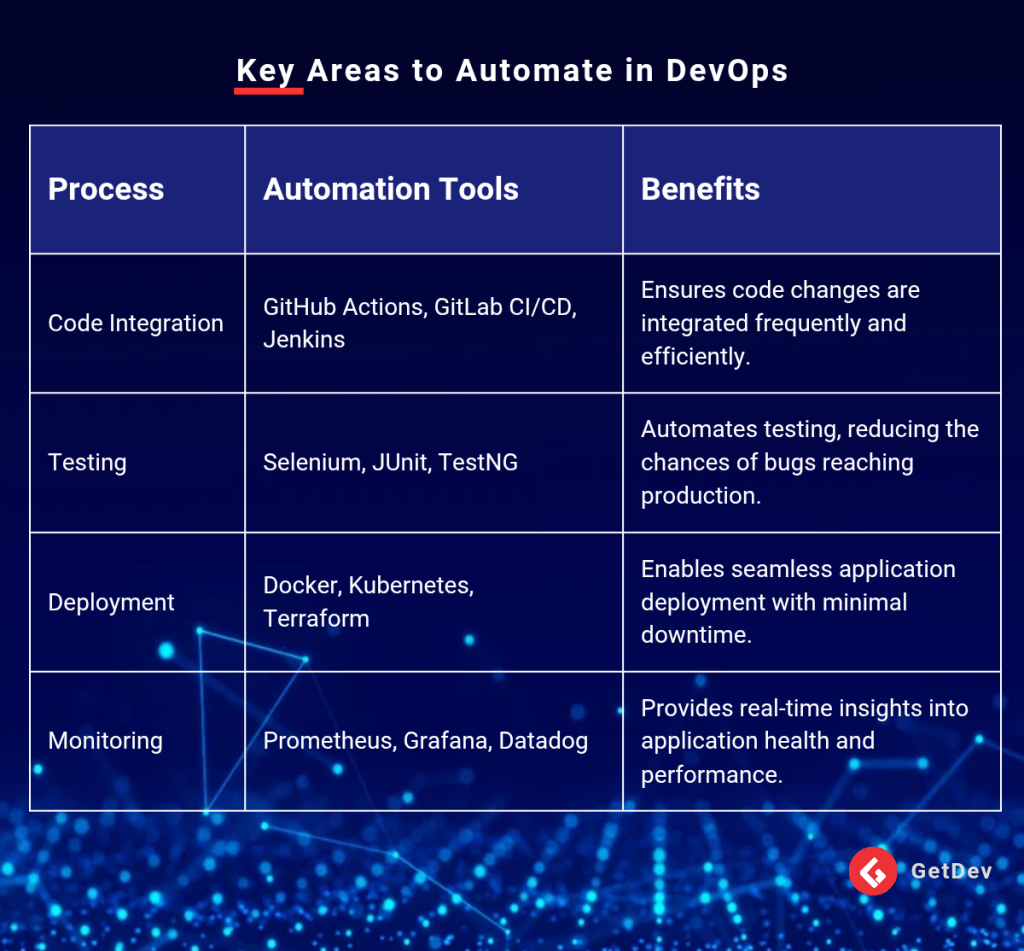
Automating these processes eliminates delays associated with manual interventions, enhances collaboration between teams, and significantly improves CI/CD efficiency.
2. Implement Version Control with Git
A reliable version control system is the foundation of a well-structured DevOps pipeline. Git, the most widely used version control system, enables teams to track code changes, collaborate efficiently, and ensure a stable and structured development process. Using Git in a DevOps workflow ensures that all modifications are documented, recoverable, and traceable. This prevents accidental overwrites, reduces code conflicts, and allows multiple developers to work on the same project without disruption.
Best Practices for Git Version Control
- Adopt a clear branching strategy – Use GitFlow, trunk-based development, or feature branching for better organization.
- Commit frequently and write meaningful commit messages – This makes tracking changes easier and facilitates collaboration.
- Use pull requests for code reviews – Code reviews improve quality and catch potential issues before merging.
- Implement access control policies – Prevent unauthorized modifications to critical branches.
A well-managed Git workflow plays a critical role in ensuring DevOps Best Practices for Faster Deployment by maintaining a seamless and conflict-free development process.
3. Use Infrastructure as Code (IaC)
Managing infrastructure manually is inefficient and prone to errors. Infrastructure as Code (IaC) solves this issue by allowing teams to define, manage, and provision infrastructure programmatically. IaC eliminates inconsistencies and enables rapid scaling, making it a key component of DevOps Best Practices for Faster Deployment and CI/CD Efficiency. By using IaC tools like Terraform, Ansible, and CloudFormation, teams can automate infrastructure provisioning, version control their infrastructure, and deploy resources in a consistent manner across different environments.
Key Benefits of IaC
- Faster provisioning – Reduces deployment times from hours to minutes.
- Improved consistency – Eliminates discrepancies between development, testing, and production environments.
- Version-controlled infrastructure – Changes to infrastructure can be tracked, reviewed, and rolled back if necessary.
- Easier scalability – Infrastructure can be dynamically scaled up or down based on demand.
Using IaC in CI/CD pipelines ensures that infrastructure changes are tested and deployed with the same rigor as application code, reducing downtime and improving reliability.
4. Shift Left on Security and Testing
Security and testing should be integrated into the early stages of the development lifecycle rather than treated as a final step. This “shift-left” approach helps detect and resolve security vulnerabilities and software defects before they escalate, ensuring CI/CD efficiency and high software quality.
Security Best Practices in DevOps
- Automate security scans – Use tools like SonarQube, Snyk, and OWASP Dependency-Check to identify vulnerabilities in the codebase.
- Implement role-based access control (RBAC) – Restrict access to sensitive systems and data based on job roles.
- Enforce security policies in CI/CD pipelines – Ensure that builds fail if security tests do not pass.
- Use secrets management tools – Secure credentials and API keys using HashiCorp Vault or AWS Secrets Manager.
Testing Strategies for CI/CD Efficiency
- Unit testing – Validates the functionality of individual components.
- Integration testing – Ensures that different software modules interact correctly.
- Performance testing – Measures application responsiveness under various workloads.
- Security testing – Identifies vulnerabilities before deployment.
By shifting left on security and testing, teams reduce post-deployment failures, minimize risks, and accelerate release cycles—all of which contribute to faster deployment and CI/CD efficiency.
5. Leverage Containerization and Microservices for Scalability
Traditional deployment methods often lead to compatibility issues between development, testing, and production environments. Containerization solves this problem by packaging applications along with their dependencies, ensuring they run consistently across different environments.
Why Use Containers?
- Consistency – Eliminates the “works on my machine” problem.
- Portability – Applications can be deployed on any infrastructure with minimal modifications.
- Efficiency – Containers use fewer system resources compared to traditional virtual machines.
Docker is the most popular containerization platform, allowing teams to create lightweight, portable application environments. To manage and scale containerized applications efficiently, Kubernetes provides automated deployment, scaling, and management of containers.
In addition to containerization, adopting a microservices architecture allows teams to break down large applications into smaller, independent services. This enables:
- Independent deployment – Teams can deploy updates to individual services without affecting the entire system.
- Faster development cycles – Microservices facilitate agile and continuous development.
- Improved fault tolerance – Failures in one microservice do not impact the entire application.
By leveraging containerization and microservices, organizations can achieve higher deployment speed, greater scalability, and improved CI/CD efficiency.
6. Monitor and Optimize Performance
Real-time monitoring is essential for maintaining system stability, detecting issues early, and ensuring smooth deployments. Without proper monitoring, teams may struggle to identify bottlenecks, leading to performance degradation and extended downtime.
Key Monitoring Strategies
- Use observability tools – Platforms like Prometheus, Grafana, and New Relic provide real-time insights into system health.
- Implement centralized logging – The ELK Stack (Elasticsearch, Logstash, Kibana) helps teams aggregate, analyze, and visualize log data.
- Set up alerting mechanisms – Automated alerts notify teams of performance anomalies before they escalate.
- Track key performance indicators (KPIs) – Monitor metrics such as request latency, CPU utilization, and memory consumption to optimize system performance.
Monitoring ensures that teams can quickly detect issues, implement proactive fixes, and maintain a high level of CI/CD efficiency.
CI/CD Pipeline Optimization for Faster Deployment
A well-optimized CI/CD pipeline is crucial for faster deployment and CI/CD efficiency. Without a streamlined workflow, development teams may face bottlenecks, delayed releases, and operational inefficiencies. A CI/CD pipeline acts as the backbone of DevOps, ensuring that new code changes move from development to production seamlessly, with minimal risk and downtime.

Optimizing your pipeline requires focusing on automation, efficiency, and feedback loops. Below is a structured flow that maximizes speed and reliability.
Optimized CI/CD Pipeline Flow
1. Code Commit – A developer pushes code changes to a Git repository (GitHub, GitLab, Bitbucket). This triggers an automated pipeline execution.
2. Automated Build – The CI tool (Jenkins, GitHub Actions, GitLab CI/CD) compiles the code, resolves dependencies, and generates build artifacts. Any syntax errors or failed dependencies result in immediate feedback.
3. Automated Testing – A comprehensive set of tests, including:
- Unit tests to verify individual functions and modules.
- Integration tests to check if different components work together.
- Security scans using tools like SonarQube and Snyk to identify vulnerabilities early.
- Performance tests to ensure application responsiveness under load.
4. Artifact Generation – A deployable package is created, such as a Docker image, a JAR file, or an EXE binary, depending on the application type.
5. Staging Deployment – The build artifact is deployed to a staging environment identical to production. This environment is used for final testing, QA validation, and user acceptance testing.
6. Approval Process – Depending on the organization, this step can be manual (where a lead developer or QA engineer approves the release) or automated (based on predefined criteria such as test success rates and code coverage).
7. Production Deployment – Once approved, the artifact is automatically deployed to production using blue-green deployment, canary releases, or rolling updates to minimize downtime.
8. Monitoring and Feedback – After deployment, monitoring tools (Prometheus, Grafana, New Relic) track performance metrics, error rates, and system health. If issues arise, the system automatically triggers alerts for quick intervention.
A well-optimized CI/CD pipeline reduces deployment time from hours to minutes, enhances reliability, and ensures smooth software delivery.
Common Pitfalls in DevOps and How to Avoid Them
Even the best DevOps Best Practices can lead to inefficiencies if not implemented correctly. Below are some common challenges organizations face and strategies to mitigate them:

A CI/CD pipeline should be efficient, automated, and resilient to ensure a fast, secure, and reliable deployment process. By avoiding these pitfalls and continuously refining the pipeline, teams can achieve superior CI/CD efficiency and faster deployment.
The Future of DevOps: What’s Next?
The DevOps landscape is continuously evolving, driven by technological advancements and industry demands. As software development accelerates, DevOps practices must adapt to keep pace with the changing landscape. Below are some key trends shaping the future of DevOps Best Practices for Faster Deployment and CI/CD Efficiency:
- AI-Powered DevOps – Artificial Intelligence (AI) and Machine Learning (ML) will play a crucial role in automating processes, optimizing workflows, and predicting potential failures. AI-driven DevOps will:
- Enhance anomaly detection and predictive analytics.
- Improve automated testing and self-healing infrastructure.
- Optimize resource allocation for faster deployments.
- GitOps – A Git-centric approach that treats infrastructure as code and manages deployments directly from Git repositories. GitOps enhances:
- Version Control – All changes are traceable and easily reversible.
- Automation – Deployments are triggered automatically when changes are committed.
- Security – Git-based access control ensures a secure workflow.
- Serverless Computing – Faster deployments with minimal infrastructure management. Developers can focus on coding while cloud providers handle infrastructure provisioning. Benefits include:
- Faster time-to-market – No need to configure or maintain servers.
- Scalability – Resources scale dynamically based on demand.
- Cost efficiency – Pay only for the resources used.
- DevSecOps – Integrating security into the DevOps process to build secure applications from the ground up. Key practices include:
- Automated security testing – Running vulnerability scans in CI/CD pipelines.
- Compliance as code – Enforcing security policies programmatically.
- Continuous monitoring – Detecting threats in real time.
As DevOps Best Practices for Faster Deployment and CI/CD Efficiency continue to evolve, adopting these trends will be essential for maintaining a competitive edge in software development.
Conclusion
Let’s face it—nobody enjoys failed deployments, last-minute debugging, or production rollbacks at 2 AM. But with DevOps Best Practices for Faster Deployment and CI/CD Efficiency, these nightmares can become a thing of the past.
By adopting automation, streamlined CI/CD pipelines, containerization, infrastructure as code, and security-first practices, teams can achieve faster, error-free deployments with minimal disruptions. The goal is simple: deliver high-quality software quickly, efficiently, and securely.
However, DevOps isn’t a one-time fix—it’s an ongoing journey. Success in CI/CD efficiency requires constant learning, improvement, and adaptation to new technologies and methodologies.
- Assess your current CI/CD workflow – Identify bottlenecks and areas for improvement.
- Automate where possible – Reduce manual tasks to increase efficiency.
- Implement security from the start – Protect your applications from vulnerabilities.
- Experiment with AI and GitOps – Stay ahead of the curve with next-gen DevOps trends.
DevOps is not just about speed—it’s about delivering better software, faster. The organizations that prioritize DevOps Best Practices for Faster Deployment and CI/CD Efficiency will outperform competitors, ship software faster, and ensure seamless user experiences.
So, are you ready to optimize your DevOps workflow and watch your deployment speed skyrocket? The future of software development belongs to those who move fast, innovate continuously, and embrace DevOps fully.